
LingoLayer
Translates any app's screen right where the text is, in real time
Overview
Foreign-language apps, games and forums: copying text into a translator breaks the flow.
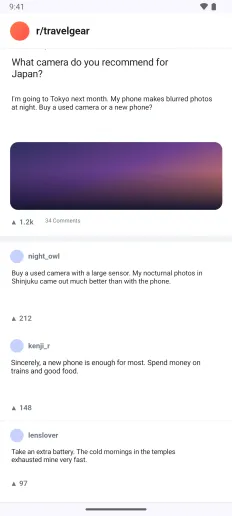
LingoLayer translates what's on your screen, right where it is. Stop scrolling and the text switches to your language. Everything is processed on your phone.
Screenshots
Features
Translations sit on top of the original
Each translation appears exactly where the original text was, at a similar size over a matching background, so the layout stays intact. The overlay never blocks touches.
Only in apps you choose
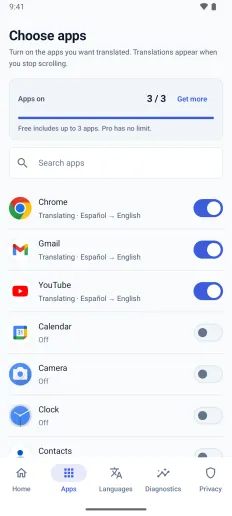
Pick the apps you want translated. It works only while one of them is on screen, and pauses as soon as you switch apps or open the keyboard.
Fully on-device
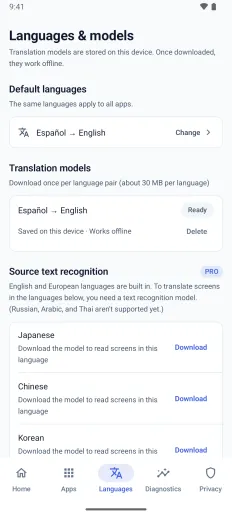
Text recognition and translation both run on your phone. Download a language model once (about 30 MB per language) and translate offline.
19 target languages
Translate English, Spanish, French, German and other Latin-script languages into 19 languages. Pro also reads Japanese, Chinese, Korean and Hindi screens.
No ads. Pro is a one-time purchase
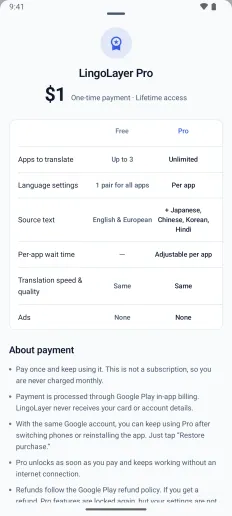
There are no ads at all. Use up to 3 apps for free; Pro is a single purchase, not a subscription, unlocking unlimited apps and a different language for each.
Data and permissions
- On-screen text and translations are never sent to a server. Translation happens entirely on your device.
- The accessibility service is used only to read text in the apps you turn on and to draw translations over them.
- The translation cache stays on this device and can be cleared anytime. Payments are handled by Google Play.
Note
Apps that block screen capture, such as banking apps, cannot be translated, and translation quality depends on how clearly the original text can be recognized.